

StreetSiren User Guide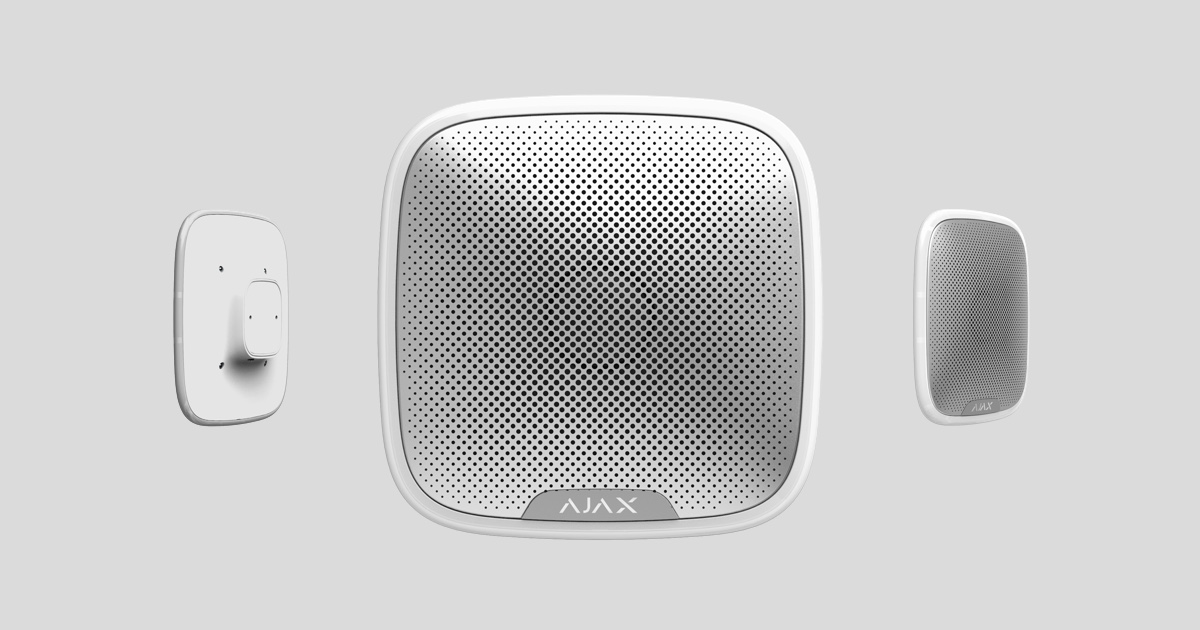
StreetSiren is an outdoor alarm speaker with a power output of up to 113 dB. It features quick installation and setup, LED warning lights, and a battery life of up to 5 years thanks to its built-in battery.
StreetSiren operates within the Ajax security system by linking to the central Hub via the Jeweller protocol. The link range is up to 1700m in an unobstructed environment.
The alarm siren can be set up via a mobile app on iOS and Android.
The device only works with the Hub; it is not compatible with the Ajax uartBridge and Ajax ocBridge Plus modules.
The Ajax security system can operate independently, but users can also link it to a security company's monitoring center.
👉 Buy StreetSiren outdoor alarm now!
Features and details
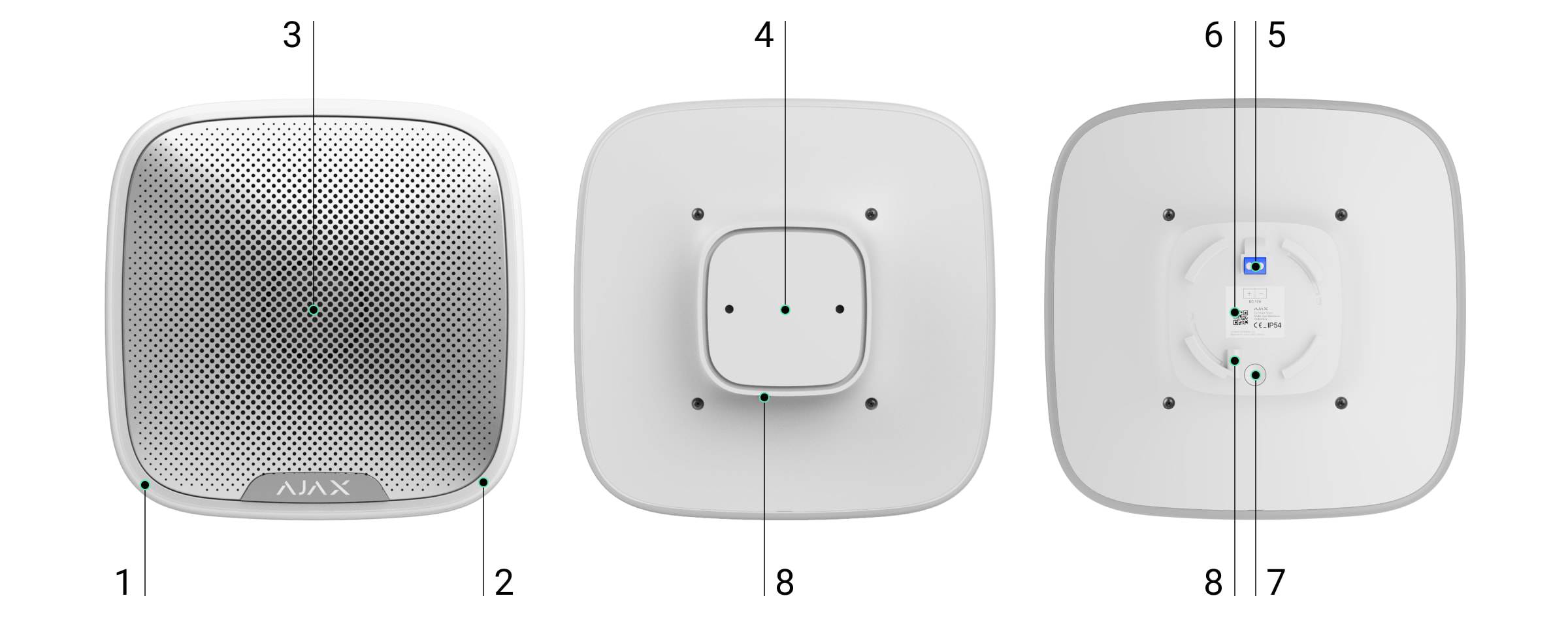
-
LED light frame
-
Indicator lights
-
Alarm siren under metal mesh
-
SmartBracket Smart Hanging Board
-
External power port
-
QR Code
-
On/off button
-
The SmartBracket is secured by screw holes.
How StreetSiren works
Alarm sirens significantly improve the effectiveness of security systems, serving as the most effective means of dealing with intrusion. With their high volume, these alarm signals are sufficient to scare away intruders.
The device is equipped with a loud chime – the sound of the alarm siren can be heard from a distance. If installed correctly, the device will be difficult to remove and the activated alarm siren will be difficult to deactivate: the body is robust, the power supply is automatic, and the on/off switch will be blocked when the security system is in protection mode.
StreetSiren does not have a vandal-proof switch mechanism; instead, it uses an accelerometer (motion sensor) to detect instances of tampering with the device.
Connect the siren to the Hub.
The StreetSiren alarm system only works with the Ajax protection system; up to 10 alarms can be linked to one system simultaneously.
Before starting the connection:
-
Install the Ajax app on your phone and follow the instructions to set up the Hub (Hub, Hub Plus).
-
Create a user account, add the Hub to the app, and create at least one room.
-
Open the Ajax application.
-
Turn on the hub and check your internet connection.
-
Check and make sure that the Hub is in the Disabled mode and not updating (check the status displayed in the application).
⚠️ Only users with administrator privileges can add new devices to the Hub.
Devices can only be added when the system is in Deactivated mode.
-
Open a room in the app and select "Add device".
-
Name the device, scan the QR code or manually enter the device's code number into the app (the code number is located under the lid and on the box), and select a Room for the device.

3. Select “Add” - The countdown begins.
4. Turn on the device (by pressing the power button for 3 seconds). 
The power button is recessed into the body of the device and is quite stiff; you can use a thin, solid object to press it.
A request to connect to the Hub will be sent shortly after the device is powered on. If you are unable to connect to the Hub, try turning the device off and on again after 5 seconds.
If the device is already linked to a different Hub, power off the StreetSiren and repeat the device adding process as usual.
If the connection to the Ajax Hub fails, the alarm will go off after 6 seconds. You can repeat the connection attempt later. To retry the connection, you do not need to turn off the device.
The alarm siren connected to the hub will appear in the list of hub devices in the application. The siren status in the list updates depending on the device query time set in the hub settings, with the default value being 36 seconds.
Device states
Device → StreetSiren
|
Category |
Meaning |
|
Temperature |
The temperature of the device. Measured on the processor and changes gradually. |
|
Signal strength |
Signal strength of the connection between the Hub and the sensor device. |
|
Battery level |
The remaining battery level of the device is displayed in 25% increments. |
|
Lid |
The device's anti-tampering mechanism reacts when the device is removed from its installation location or the housing is damaged. |
|
Connect |
Connection status with the Hub |
|
External source |
External power supply status of the device |
|
Alarm volume |
Alarm volume level |
|
Alarm duration |
Duration of the alarm |
|
Alarm if moved |
The alarm will be triggered if the device is moved from its installation location. |
|
Display activation mode |
If activated, the LED will flash once every 3 seconds when the system is in the activated state. |
|
A "Beep" sound will be emitted when entering Activation/Deactivation mode. |
If activated, the alarm will signal with an LED light and a short beep when the system is placed in Activate/Deactivate mode. |
|
Latency |
If activated, the alarm will sound with a delay (only supports devices with software version 3.50 or higher). |
|
Software |
The device's software version |
|
Device ID |
Unique device identification |
Set up the device.
Device → StreetSiren → ⚙️
|
Customize |
Content |
|
first line |
The device name can be customized. |
|
Room |
Select a room where the device is actually installed. |
|
Alarm volume |
Alarm volume: Loud, Normal, Low |
|
Alarm duration |
Alarm duration: from 3 to 180 seconds per alarm. |
|
Alarm triggered when moved. |
The alarm will be activated if you flip the device over or remove it from its mounting position. The integrated accelerometer needs about a minute to stabilize its position. Allow time to test the functionality of the device in case of activation until this time has elapsed. |
| Armed Forces Indicator | If activated, the alarm LED will light up with a 2-second pause when the security system is triggered. |
|
A "Beep" sound will be emitted when entering Activation/Deactivation mode. |
If activated, the alarm will signal with an LED light and a short beep when the system is placed in Activate/Deactivate mode. |
|
Latency |
If activated, the alarm will sound with a delay (only available on devices with software version 3.50 or higher). |
|
Check the volume. |
Start the alarm to test. |
|
Check the wave intensity. |
Switch the device to signal strength testing mode. |
|
Check for decline |
Switch the keypad to signal attenuation test mode (only available on devices with software version 3.50 or higher). |
|
User manual |
Open the device's user manual. |
|
Unconnect the device. |
Disconnect the device from the hub and delete all settings. |
Display status
|
Event |
Display |
|
Alarm |
An audible warning will be given, and the LED border will light up red. |
|
Turn on the device |
The LED ring lights up and then turns off. |
|
Turn off the device |
The LED ring lights up for 1 second then flashes 3 times. |
|
Registration error |
The LED in the corner flashes 6 times, then the entire LED ring flashes 3 times, after which the device powers off. |
|
The system is set to activation mode. |
The LED ring flashes once and emits a short beep. |
|
The system is set to Deactivation mode. |
The LED ring flashes twice and emits two short beeps. |
|
Speaker in activated mode |
The LED in the corner lights up and stays off for 2 seconds. |
|
Low battery |
The LED in the corner lights up and turns off when the system is Activated/Deactivated (if the indicator is activated), the tamperer is triggered, or an alert is given. |
Check functionality
The Ajax security system allows for testing to assess the functionality of connected devices.
The testing modes will not start immediately but after a 36-second cycle when using the default settings. The start time of the test depends on the scanning cycle settings of the sensor device (see the “Jeweller” settings in the Hub settings).
-
Check the volume.
Equipment installation location
The installation location of the device is determined by the distance between the device and the hub; the presence of obstacles between the devices will affect radio wave transmission: walls, concrete floors, large objects placed in the room.
Check the signal strength displayed in the application.
If the signal strength is only one bar, Ajax won't guarantee that the system will work perfectly. Do everything you can to improve the signal quality! At the very least, try moving the device; even just 20 cm can significantly improve the connection quality.
If, after moving, the device still has a weak or unstable signal, use a ReX signal booster.
The device's body has an IP54 dust and moisture resistance rating, allowing it to operate outdoors. A recommended installation height of 2.5 meters or more is recommended, keeping the device out of reach of intruders.
When installing and operating StreetSiren, comply with general electrical safety regulations for the use of electrical equipment, as well as the requirements of legal acts governing electrical safety.
Disassembling the device while it is energized is strictly prohibited! Do not use the device if the power cord is damaged.
Install alarm systems.
Before installation, make sure you have chosen a location that meets the requirements of this instruction manual.
Disassembling the device while it is energized is strictly prohibited! Do not use the device if the power cord is damaged.
-
The StreetSiren siren can operate for up to 5 years from its built-in battery (depending on the frequency of communication required from the central hub in 1 minute) or approximately 5 hours of continuous sound. If you want to use an external power source (12V), drill a hole for the power cord on the SmartBracket mounting plate. Before installation, make sure the power cord is not damaged! You need to drill a hole in the SmartBracket to route the external power cord.
-
Secure the SmartBracket board to the surface using the included screws. After selecting other attachment hardware, ensure that they do not damage or deform the board.
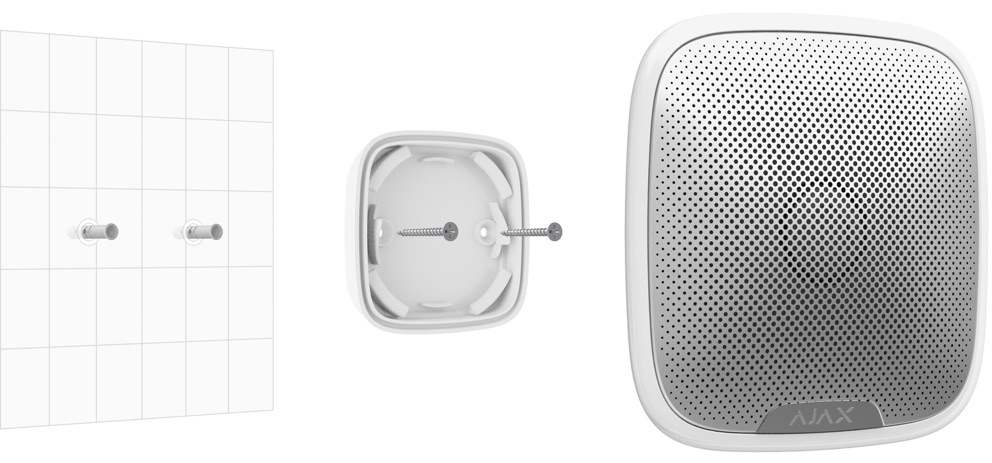
We warn against using double-sided tape for temporary or all permanent attachments to the siren.
-
Mount the alarm siren on the SmartBracket and rotate it clockwise. Secure the device with screws.
Securing the alarm with screws will minimize the risk of accidental theft of the device.
Maintain the alarm siren and replace the battery.
You should regularly check the functionality of the Ajax security system.
Clean the machine body of dust, cobwebs, or other dirt. Use only a soft, dry cloth for maintenance.
Do not use cleaning agents containing alcohol, acetone, or gasoline to clean the equipment.
The built-in battery can ensure the device operates for up to 5 years (with a communication frequency with the Hub of 1 minute/time) or provides continuous alarm for 6 hours. If the battery is depleted, the system will send a notification to the user, and the LED will slowly light up and turn off when the activation mode is enabled.
Do not attempt to replace the battery yourself! Contact Customer Support or a Service Center to have the battery replaced.
Technical specifications table
|
Type of alert |
Sound and LED lights |
|
Warning volume |
85 dB to 113 dB at a distance of 1 m (adjustable) |
|
Sound range |
3.5 ± 0.5 kHz |
|
Protection against vandalism |
Accelerometer |
|
Bandwidth |
868.0 – 868.6 MHz or 868.7 – 869.2 MHz |
|
Maximum power |
Up to 25 mW |
|
Radio wave module |
GFSK |
|
Connection range |
Up to 1500m in unobstructed conditions. |
|
Source |
4-pin x CR123A, 3V |
|
Battery life |
Up to 5 years |
|
External source |
12 V, 1.5 A DC |
|
Protect the device body. |
IP54 standard |
|
Operating temperature range |
From -25°C to +50°C |
|
Operating humidity range |
Up to 95% |
|
Size |
200 x 200 x 51 mm |
|
Mass |
528 g |
The complete set includes
-
StreetSiren
-
CR123A battery (pre-installed) - 4 Batteries
-
Installation screw set
-
User manual
Guarantee
The product comes with a 2-year manufacturer's warranty.
If the device is not working as designed, please contact our technical support department before sending it in for warranty service – as over 50% of cases are simply issues with settings.